What it took to make an LLM build enterprise integrations
An AI engineer explains some of what he had to do to build the Digibee Digital Worker.

PUBLISHED
August 18, 2026
An AI engineer explains some of what he had to do to build the Digibee Digital Worker.
In February, my team ran an experiment to measure how well LLMs generated integration workflows. We graded the LLM’s performance on a scale of zero to one, with one being a perfect match for our “gold standard,” expert-built workflow.
The LLM scored 0.17. Its workflow used a simplistic structure that didn’t follow best practices or make good use of patterns. Despite that, the workflow could be narrowly defined as “functional.” But enterprises don’t want integrations that are merely functional. They want integrations that are robust, reliable, and understandable.
This experiment was deliberately unfair. My team had been building a harness to guide LLMs to draft integration workflows. We wanted to compare the performance of different versions of our harness to each other as well as a baseline that used none of our advanced interventions.
A few months later, a more advanced version of the same system generated a complicated EDI workflow that our CTO deemed 100% deployment-ready.
That wasn’t a typical result, but it happened. I’d like to tell you how my team got there.
At Digibee, we use the most advanced technology available to accelerate integration work. Eight years ago, the founding team built a cloud-native platform that automatically provisioned and optimized cloud resources for integration engineers. Now, we’ve built an AI-native version that helps engineers complete projects up to 20x faster.
I've spent my recent months building that system. The full project includes multiple agentic utilities that elevate enterprise integration work. This post will focus on our tool that ingests specifications and produces close-to-ready workflows in as little as five minutes.
A 0.17 score doesn't tell you what to fix. Getting from there to a workflow that met our CTO’s approval meant solving problems that don't show up in a demo.
None of these got solved all at once. They got worn down, version by version, until the system began to earn our trust.
Our baseline experiment demonstrated that LLMs had no concept of what a production integration workflow is supposed to look like—at least not one built to run on our platform. General-purpose training data doesn't reliably surface the structural knowledge an integration engineer carries. A model reasoning from scratch about a Salesforce-to-NetSuite sync has to reinvent watermark management, pagination, rate limiting and more on both sides. Every time. For every integration.
We solved this by encoding that knowledge as a library of named, reusable patterns. They covered incremental sync, event-driven orchestration, request-response, and more. Then we built the generation process around them.
The agent's job is no longer to invent integration infrastructure. It's to select the right patterns, wire them to the right connectors, and map the customer's specific fields and routing logic. The hard parts are already built. The agent composes.
We also distribute the work across specialized sub-agents. A single agent carrying the full context of building a workflow runs into coherence problems as the context fills. Narrower scope per agent keeps the output consistent.
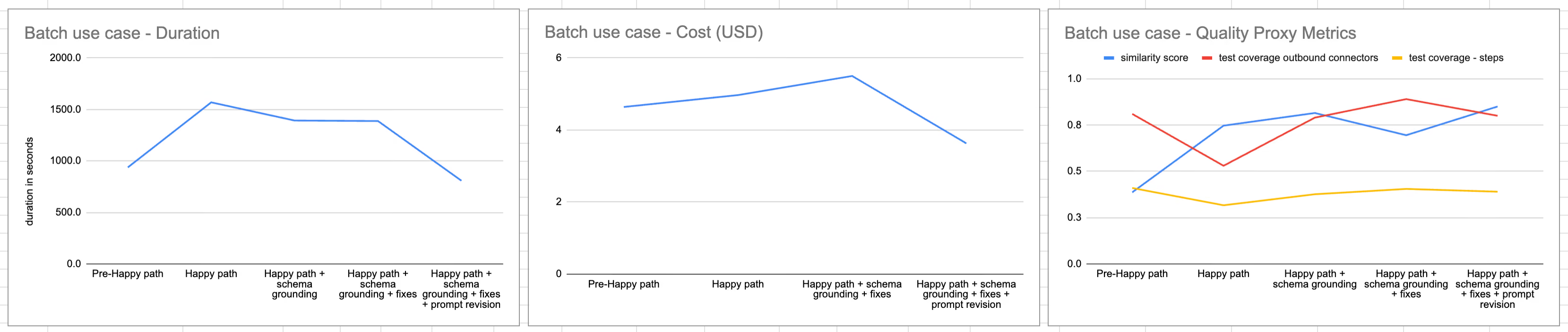
Adding patterns boosted the similarity score. The work after that was a different kind of problem.
Patterns gave the agent a structural foundation. The next problem was that it didn't reliably know what it was connecting to.
To validate a generated workflow without hitting real external endpoints (REST APIs, databases, Salesforce, SAP, etc.), we built a system that generates mocked versions of those connectors. Once the system mocked the connectors, an agent identified the single most representative success path—typically the longest one that achieved the core business logic without hitting error handlers.
This “happy path” approach initially created a misleading metric: outbound connector test coverage dropped 35%. That drop reflected a deliberate design tradeoff, not a regression in quality. Our previous approach allowed the system to explore multiple solutions. We gave up exhaustive coverage in exchange for speed and immediate executability.
WIth or without a pre-determined path, the agent needed connector schemas that defined what each API requires, accepts, and won't tolerate. That understanding determines whether the workflow works in production or breaks on the first edge case. The agent was supposed to fetch these on demand. In practice, it mostly didn't.
We fixed this by removing the decision from the agent. We added a deterministic intermediate step that injects the relevant connector schemas before assembly begins. Not a prompt instruction. A constraint. Coverage recovered 49%. Duration dropped 11%.
We’ve written more than 100 prompts in the course of building the Digibee Digital Worker. Some of them have had more than 20 versions. With all that iteration, and the way prompts interact with each other, it can be hard to tell what changes improved or degraded performance.
In code, we’ve long solved that challenge through version control and structured testing. We applied the same solution to prompts by using the Opik prompt management platform.
Our prompt iteration loop follows this pattern:
Most prompts go through 10 to 20 versions before they stabilize, but stabilization isn’t permanent; we revisit prompts when the system changes or a new failure pattern appears.
The main risk we watch for is overfitting. It's easy to improve a prompt's performance on cases you've already seen by adding more specific instructions. It's also easy to make it worse on everything you haven't seen yet.
The EDI result in the opening was real. It was also one session. The current system typically scores between 80 and 90% similarity, though results can vary widely depending on complexity and use case. For many workflows, that means a first draft that needs review and some adjustment before deployment; not finished, but a strong start. For other workflows, it means we’re not there yet, but will get there soon.
As we continue our work, we’re expanding our Digital Worker’s functionality along the integration lifecycle, and growing the patterns library to cover more use cases.
If you're managing an integration backlog that grows faster than your team can clear it, that's what this was built for. The Digibee Digital Worker is available in early access.
[Get early access to the first AI-native integration platform →]
Luciano Chaves is an AI Engineer Specialist at Digibee, where he builds GenAI solutions for low-code integration pipelines: chat orchestration, agentic workflows, and retrieval-augmented generation (RAG). He’s worked in NLP and virtual assistants since 2017, with roles at Jusbrasil, QuintoAndar, and Itaú Unibanco. Chaves studied Computer Engineering from Universidade Presbiteriana Mackenzie, where his research focused on epidemiological modeling with cellular automata.
RECOMMENDED POSTS
Coding agents don't know what they don't know about building intergrations.


A low-code platform allows you to develop systems with minimal code, using visual interfaces. Learn how it works and its main benefits.

Developers now prompt AI tools to build for them. Software companies have built MCP servers that let you work on their platforms straight from an AI chat interface. There’s a better way: starting from a specification.
AI will not replace deterministic workflows in financial services. It complements them with reasoning and context capabilities where rules alone are not enough.
What differentiates an AI-native platform from an AI-powered one? A platform rebuilt for agents, with specialized workflows and collaboration between people and AI.
Developers now prompt AI tools to build for them. Software companies have built MCP servers that let you work on their platforms straight from an AI chat interface. There’s a better way: starting from a specification.
Is the source of truth held in the code, or in the specification? Why "vibe coding" falls short for enterprise infrastructure and why durable specifications are essential.

AI will not replace deterministic workflows in financial services. It complements them with reasoning and context capabilities where rules alone are not enough.